Contact
Skip to main content


From idea to working prototype in 2 hours: vibe-coding in practice
Last week during a meeting, we had an idea for a new dashboard for one of our clients. Normally, this would mean: writing down assumptions, creating initial wireframes in Figma, building a prototype, gathering feedback, making adjustments, discussing again. If everything goes smoothly, you have something to show the client after about a week.
But with AI applications becoming widely available, we've been taking a different approach. We used Figma Make, wrote an initial prompt, and started vibe-coding. Two hours later, we had a working prototype with real interactions, sample data, and flows you could test as if it had already been built. Not static images, but a functioning prototype. Not polished, not finished, but good enough to test and learn from.
This article is about what this does to our design process. Not as yet another AI hype story, but as a practical reflection: what works, where you save time, and where you still need to stay sharp. We base this on three concrete cases we developed using vibe-coding.
We chose three completely different domains specifically to test whether vibe-coding only works for 'nice demos' or also for complex, serious systems. The latter is what Hike One primarily focuses on.
ProRail manages the Dutch railway network. During disruptions, every minute counts. Traffic controllers need to immediately see where the problem is, what the impact is, and what action makes sense. We built a dashboard combining map visualizations, timelines, and action suggestions.
EDSN facilitates data exchange for energy grid operators. The energy transition has caused applications for solar panels, charging stations, and heat pumps to explode, while the grid is getting increasingly congested. In this case, we built a dashboard providing insight into looming congestion, waiting lists, and where expansion is needed.
A mortgage provider processes hundreds of applications per month. Each application goes through multiple steps, and every delay increases customer stress. Here we explored how a dashboard helps advisors make bottlenecks, deadlines, and turnaround times visible.
The content differs, but the approach was the same: get from idea to something you can use to make decisions as quickly as possible.
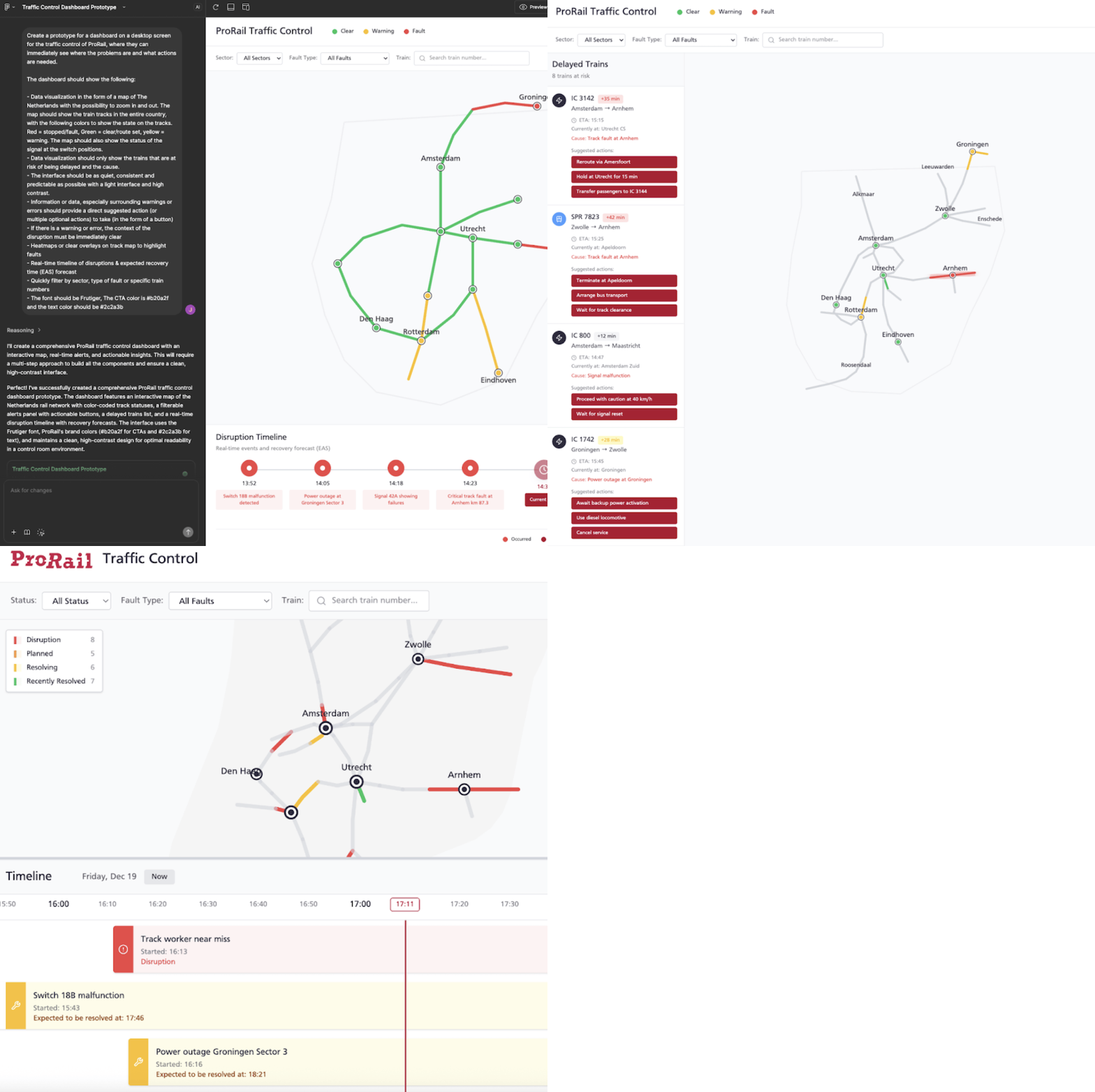
ProRail – Railway Incident Dashboard: Download the PDF with all prompts.
Before vibe-coding
Gather ideas → Figma → discuss → adjust → discuss again → approval. This easily takes several weeks, and then the real work still needs to begin.
With vibe-coding
Gather ideas → vibe-code → test prototype → iterate.
Within one day.In the ProRail case, during a conversation the idea emerged to show disruptions not as separate notifications, but as time blocks showing how long they've been running and the expected recovery time. Normally, that would have been a sketch. Now within an hour there was an interactive timeline you could scroll, filter, and click. The effect: fewer handoff moments and less interpretation. Everyone looks at the same behavior and can form opinions about it.What also worked well was not making one prototype, but 3 completely different ones, each created with unique prompts. We placed these outcomes side by side, chose the best components, and combined them again.
Every designer knows this problem. You try to explain an interaction with arrows, annotations, and hand gestures. The message gets halfway across and everyone fills in the rest themselves. With vibe-coding, you show it directly.
In the EDSN case, for example, we had filters that affect multiple charts simultaneously. In a static mockup, that's hard to communicate. In a working prototype, you click on 'Utrecht' and immediately see how all the data adjusts. No more discussion about what was 'intended'.
Working prototypes communicate better than pictures. That sounds logical, but the difference in speed is significant.
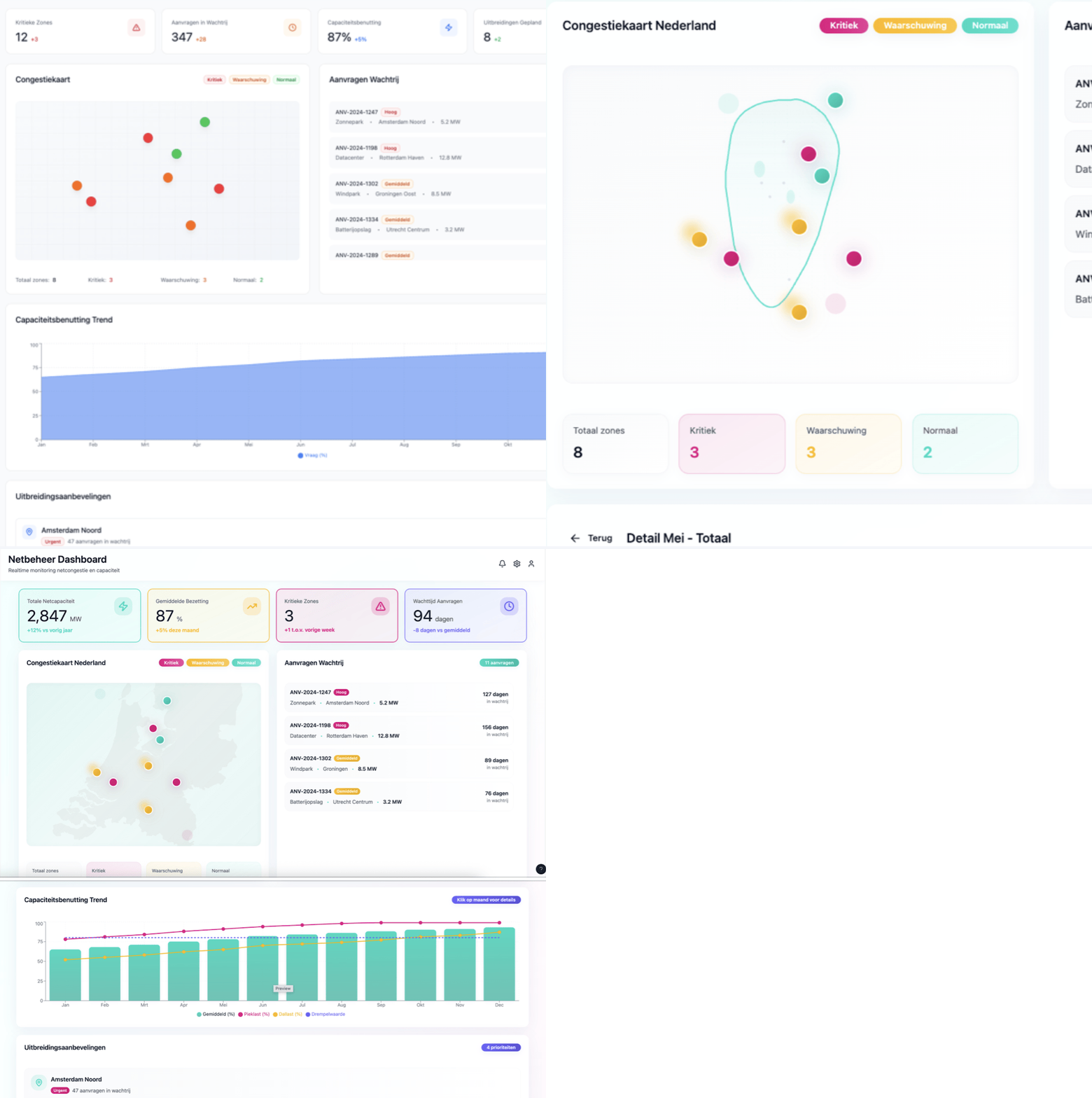
EDSN – Network Congestion for Energy Grid Operators: Download the PDF with all prompts.
Before
Work out variant A in Figma, work out variant B in Figma, then have a long discussion about what we're going to build.
Now
Vibe-code both variants, test them the same day, and let usage decide.In the mortgage case, we played with two navigation structures: one around process steps and one around status and urgency. Instead of talking about it at length, we built both and presented them to users. Within an afternoon, it was clear which worked better.Failing faster means learning faster. And because the cost per variant is low, you dare to try more.
A classic frustration: the design is correct, but during development it feels slightly different. Responsive behavior deviates, animations are too slow or too fast, details get lost.
With vibe-coding, that boundary blurs. In the ProRail and EDSN cases, we simulated the work of designers and developers together in the same prototype. The code Figma Make generates is certainly not production-ready, but concrete enough to discuss together.
The result: less back-and-forth and faster understanding. Designers and developers speak the same language sooner.
Normally you wait until something is 'finished enough' before you dare to test it. With vibe-coding, that threshold is lower.
In multiple cases, we tested with users after just a few hours. Rough, but working. Hypotheses that would normally only be tested in week three or four could now be validated or shot down in week one.
That saves time, but especially wasted energy in the wrong direction.
Across the three cases, we saw comparable time savings:
It's not magic and it doesn't replace design skills. But it shifts where you spend your time: less production, more thinking and lightning-fast testing.
Vibe-coding also has clear disadvantages. The biggest risk is that you approach a problem less openly. Because you see a working prototype almost immediately, a direction quickly emerges that "feels right". That first direction is often convincing, precisely because it already works. This makes it harder to keep exploring fundamentally different solutions.
Where with sketching or abstract models you stay longer in the problem space, vibe-coding pushes you into the solution space faster. Additionally, the speed can give a false sense of certainty: something works in a prototype, but hasn't been thought through for edge cases, scalability, or governance.
Design details sometimes also get too little attention. Small choices in hierarchy, timing, or behavior creep into the design unnoticed because they're filled in by the tool.
Finally, vibe-coding requires discipline in teams: without explicit moments to slow down, step back, and question assumptions, you risk speed becoming more important than sharpness.

Mortgage Provider – Managing Applications
1. Start with the right kind of projects
Dashboards, complex flows, and interaction-rich concepts work best. Developing final designs, not so much.
2. Choose your tools consciously
Figma Make worked well for us in combination with existing Figma files.
3. Learn to prompt effectively
Describe context, audience, and goals. Add constraints. Iterate in small steps.
4. Combine with your current process
Don't see vibe-coding as a replacement for Figma or code, but as an accelerator between them.
5. Share early and often
Show rough prototypes. Don't wait until it's 'pretty'.
The biggest win from vibe-coding isn't in making pixels faster, but in learning faster. In our experiments, we saw time savings of up to five times compared to our normal process.
For us, this means a different way of working: more concrete earlier, testing earlier, and making decisions earlier. Not everything becomes easier, but much becomes clearer.
Our call to action: try it. Start this week with one small experiment and experience for yourself what it does to your design process.